Next week will see some more refining, and after that I believe I will test out some simulation app in Onshape to do some Finite Element Analysis of the wall mount, just for fun!
Viser innlegg med etiketten DIY. Vis alle innlegg
Viser innlegg med etiketten DIY. Vis alle innlegg
01.04.2016
DIY 3D-printed wall mounts - part 5
It was a good thing that I went way overboard with regards to length of the clip last time I recorded. This has allowed me to just edit the length of the clip for this week, which is great since I have had a worsening cold since easter and would not have had the time or energy to record anything this week. But here is a clip for you anyway, it is time to start refining the rough designs!


17.03.2016
DIY 3D-printed wall mounts - part 4

The lid has arrived... I got really carried away with the screen recording this time. Before I knew it, I had made the lid and refined the design of both the lid and the wall mount! And had made a clip clocking in at more than 50 minutes... Luckily, Youtube has a nifty editing tool, so for this part of the project I edited the clip to be only the first 8 minutes, where I create the lid that goes on the wall mount. Enjoy!
11.03.2016
DIY 3D-printed wall mounts - part 3

It is finally here! A screen recording of me trying out Onshape for 3D CAD modelling of the wall mounts I am going to print. As you will see in the clip, I am not used to working in Onshape, I am basically learning as we go along. Had I done this in Inventor (which I have extensive experience with), I would probably have done the recording, then edit out mistakes and put audio on lastly. Since this was a learning experience for me I chose to record both screen and audio at once, so enjoy:
As you can see I did not finish the part. I figured that almost 30 minutes was more than enough in one go (actually I was amazed that I had been recording for that long, because it only felt like it was half that). This of course means that we will have to another session, and I am really looking forward to it.
In part four we will finish off the basic design by doing the cover for the screw head also, and we will refine the end design by rounding edges and making it look more "professional". Also we will have to do something creative with regards to locking the cover for the screw head in place, or else it will just slide right off the bottom wall mount once they are up on the wall.
As you saw in the clip I made the Onshape project public, so you can find it through searching for "Wall mount" in the public projects in Onshape. I have also moved the Swift Calcs calculation into the Onshape project, since that is possible now with the Swift Calcs app in Onshape.
I have also found this Onshape blog post about successful 3D-printing of larger parts (larger than the printer can print in one go) which might come in handy in the future.
I spent (or actually wasted) quite a bit of time in trying to get hold of a good screen recording software that was also cheap (read: free). After trying several open source programs and also a few free trials, I finally stumbled onto the fact that you can actually get such software as Chrome extensions! So I ended up with this one, which seems to do exactly what I need.
06.03.2016
DIY 3D-printed wall mounts - Part 2
I had hoped that part 2 of this project would be the screen-recording of me designing the wall mounts in Onshape. However this has been a hectic week, so regrettably I have not gotten that far yet. So instead I have done more thorough preparations than originally planned. A quick, hand-drawn sketch gives you an idea of what I intend to do in Onshape:

The three views to the top and left are the wall mount itself, the two views that are sectioned off are of a lid to hide the head of the screw.
The sketch is unrefined, edges will have to be rounded and so forth. Also of note is the amount and placement of the "teeth" which I have not decided on yet. And the lid for hiding the screw heads will need some form of resistance, keeping it from sliding directly off the lower wall mount, maybe in the form of an indentation on the wall mount itself that will push on the lid and cause enough friction for it to stay in place (should the design fail in this respect, it will be quickly solved with a little dab of glue...)
I have also selected the screws for the mounts, so I know have the diameter of the hole going through the wall mount, which needs to be 4 mm. The top of the conical part has to have a diameter of at least 7 mm.
As for the other dimension, such as the thickness of 3 mm of the protruding part of the wall mount, is guess work for now, but let us have a look at some quick calculations to check if it should be enough. For this we will use Swift Calcs, the link will take you directly to the worksheet that I have shared there.
Swift Calcs is a new calculation tool, and, like Onshape, it is cloud based, meaning you can do everything from your browser (although at the moment, until the next update of the Chrome browser, it has a reduced calculation speed in that particular browser. This will apparently be corrected in the next Chrome update, due to arrive later this month). Swift Calcs is currently in the beta phase and free to use. I do not know if they have some kind of business plan for when it is ready for proper release, we will just have to see. For now, I think it is an awesome free tool, giving you great flexibility so long as you have an internet connection.
Since they are still deep in the developing stage, I have also suggested adding a "lecture mode", a sort of stripped down, minimalist version of a powerpoint presentation, no fancy animations and stuff, just the worksheet divided into segments, where a certain action (i.e. a mouse-click) will make the next segment visible, while still being able to scroll freely through the segments that have already been made visible. I think this can be a powerful tool, freeing up the person doing the lecture to actually face the students (instead of the whiteboard), gaining eye-contact and more interaction. If they decide to implement something like that I will jump at the chance of using, that is for sure.
That was all for this week, hopefully I will have gotten time to do the screen-recording by next weekend.

The three views to the top and left are the wall mount itself, the two views that are sectioned off are of a lid to hide the head of the screw.
The sketch is unrefined, edges will have to be rounded and so forth. Also of note is the amount and placement of the "teeth" which I have not decided on yet. And the lid for hiding the screw heads will need some form of resistance, keeping it from sliding directly off the lower wall mount, maybe in the form of an indentation on the wall mount itself that will push on the lid and cause enough friction for it to stay in place (should the design fail in this respect, it will be quickly solved with a little dab of glue...)
I have also selected the screws for the mounts, so I know have the diameter of the hole going through the wall mount, which needs to be 4 mm. The top of the conical part has to have a diameter of at least 7 mm.
As for the other dimension, such as the thickness of 3 mm of the protruding part of the wall mount, is guess work for now, but let us have a look at some quick calculations to check if it should be enough. For this we will use Swift Calcs, the link will take you directly to the worksheet that I have shared there.
Swift Calcs is a new calculation tool, and, like Onshape, it is cloud based, meaning you can do everything from your browser (although at the moment, until the next update of the Chrome browser, it has a reduced calculation speed in that particular browser. This will apparently be corrected in the next Chrome update, due to arrive later this month). Swift Calcs is currently in the beta phase and free to use. I do not know if they have some kind of business plan for when it is ready for proper release, we will just have to see. For now, I think it is an awesome free tool, giving you great flexibility so long as you have an internet connection.
Since they are still deep in the developing stage, I have also suggested adding a "lecture mode", a sort of stripped down, minimalist version of a powerpoint presentation, no fancy animations and stuff, just the worksheet divided into segments, where a certain action (i.e. a mouse-click) will make the next segment visible, while still being able to scroll freely through the segments that have already been made visible. I think this can be a powerful tool, freeing up the person doing the lecture to actually face the students (instead of the whiteboard), gaining eye-contact and more interaction. If they decide to implement something like that I will jump at the chance of using, that is for sure.
That was all for this week, hopefully I will have gotten time to do the screen-recording by next weekend.
27.02.2016
DIY 3D-printed wall mounts - Part 1
(Norsk)
My first post with a self-made video introduction, sorry about the low sound, I will have to speak up for my next one.
As I mentioned in the video, I will be putting up the dimension I have measured here:


The red measure gives the width of the hole, and is: 5 mm at the widest, a bit more than 4 mm at the narrowest.
The blue measure gives the length of the hole, and is 2 mm.
The distance between each hole is about 3.3 mm, and the depth of the teeth on the original tabletop stand is about 1.6 mm.
As I mentioned I intend to do the 3D-modelling in Onshape, which seems to be a good, free tool, at least from the limited experience I have with it up until now. Now I have to find a good screen-capture tool in order to make the video of the CAD process for the next part. If you have a suggestion for me, feel free to comment it, or pm me in any of the social medias you can find me in.
My first post with a self-made video introduction, sorry about the low sound, I will have to speak up for my next one.
As I mentioned in the video, I will be putting up the dimension I have measured here:

The red measure gives the height from the table top, or the wall once it is finished, and is: 27 mm.
The blue gives the distance from the edge and in to the hole, and is: 6 mm.

The red measure gives the width of the hole, and is: 5 mm at the widest, a bit more than 4 mm at the narrowest.
The blue measure gives the length of the hole, and is 2 mm.
The distance between each hole is about 3.3 mm, and the depth of the teeth on the original tabletop stand is about 1.6 mm.
As I mentioned I intend to do the 3D-modelling in Onshape, which seems to be a good, free tool, at least from the limited experience I have with it up until now. Now I have to find a good screen-capture tool in order to make the video of the CAD process for the next part. If you have a suggestion for me, feel free to comment it, or pm me in any of the social medias you can find me in.
01.01.2016
Headboard
(Norsk)
A little over a year after the redecorating of our bedroom, my better half and I have finally made a headboard for our bed. Originally planned made right after the bedroom was finished, the usually stuff cropped up that needed doing first and time slipped away. Since the headboard was planned we had bought an extra length of curtain, so that we could upholster the headboard in the same fabric. My father also had a chipboard spare after they expanded their kitchen this summer, so he donated that. In addition we needed 11 buttons and a foam mattress.
A little over a year after the redecorating of our bedroom, my better half and I have finally made a headboard for our bed. Originally planned made right after the bedroom was finished, the usually stuff cropped up that needed doing first and time slipped away. Since the headboard was planned we had bought an extra length of curtain, so that we could upholster the headboard in the same fabric. My father also had a chipboard spare after they expanded their kitchen this summer, so he donated that. In addition we needed 11 buttons and a foam mattress.
The chipboard was sawn and drilled according to the drawing beneath. The bed is 180 cm wide, that became the width of the headboard too. By using height equal to halv the width, it became very easy to make the hole pattern. The holes were originally just Ø 8 mm, but it proved too difficult to hit such a tiny hole with a needle after first pushing it through 9 cm of foam mattress. So the holes were widened to Ø 22 mm (they could easy be a different size, but a 22 mm drill bit was incidentally the first one I found amongst my tools). I have not bothered with tolerances in this drawing. The chipboard was sawn with a hand circular saw, by pencil lines I had made using a yardstick and a straightedge, and the center marks for the holes were made in the same way.

In the picture beneath the chipboard is up against the wall, before all the holes were expanded to Ø 22 mm. In the picture, only the holes in the two upper corners are that big. These two holes are meant to hang the headboard onto the wall with two woodscrews. A small tip here will be to place the chipboard onto the appropriate place on the wall and mount the two woodscrews before assembling the headboard further. Then when the headboard is done, it can be placed on the wall quickly and easily.

In hindsight, it might have been better to let the chipboard be 170x80 cm by shrinking it 5 cm on both sides and the top and bottom. Then the foam mattress would protrude 5 cm outside the chipboard i every direction, which would probably have let the edges look even nicer than they do in the end result here. However it would then be necessary to have som spray glue handy, in order to glue the plate to the foam mattress. The glue was not necessary for us here, it was enough with the 11 buttons.
The curtain was placed on the floor on some protective covering (that is to say two exercise mats...)

The foam mattress, a standard 90 x 200 x 9 cm, was cut from 200 cm to 180 cm length. Then it and the chipboard were placed on top of the curtain. The curtain was folded over the edges and stapled to the chipboard. Do not save on staples here. When I worked as a furniture salesman for Bohus Jæren I got to help our warranty guy in re-upholstering a few different furnitures and experienced first-hand that placed the staples close to each other is quite positive.

Then we flipped the headboard up. While standing behind it I showed a knitting needle through a hole and the foam mattress so that it poked at the curtain fabric. My better half was ready on the other side with a button, a strong needle and quadruple thread (we used thread for button holes, since it is supposed to be really strong). By quadruple I mean that a double thread was threaded through the button, then both ends of the thread was threaded through the needle in order to avoid having knot (and weak point) on the button. The needle was pushed though the fabric where the knitting needle was, then both needle and thread was pushed through the foam mattres and out through the hole, where I pulled the needle through and held onto the thread. Then I pulled on the thread while my better half pushed the button into the headboard, and again I used the staple gun, stapling the thread to the chipboard in a back-and-forth pattern.

As I was stapling the tenth button, the thread on the ninth button snapped, shooting the button away from the headboard. Button number nine and eleven therefore got a double quadruple thread (that is to say that a quadruple thread was threaded through the button, making it double quadruple through the needle and the headboard) just in case. This will also be the method of repair should the threads on any of the other buttons snap (hopefully not in the middle of the night...).
The finished headboard was hung on the wall above the bed. The plan was to place a double spotlight in the middle, right above the headboard with the cord hidden behind the headboard, but the dimmer buttons ended up too far away to reach without sitting up in bed. Instead we put up two single spotlights, one above each nightstand.

26.12.2015
Bird feeder
(Norsk)
My oldest daughter wanted to make something with me to give to their grandparents for Christmas. My mother-in-law had a bird feeder on her wish list. Since we did not have much proper materials for a standard bird feeder, we chose to use this piece of wood instead:

Firstly we had to do some chainsaw work. The girls assisted by sweeping the dust.


The middle piece was measured to fit the drill bit I had available.

Then the drilling commenced. The girls assisted again, this time they helped to hold fast the work piece between my knees as I drilled.

Time for the hand saw. Again the girls helped with holding fast the work piece, and sweeping up the dust.


After the sawing, the girls got to pull the "innards" out of the work piece. In the background is work piece number two, since we of course needed to make two editions, one for my parents and one for my mother-in-law. Then it was chisel time!

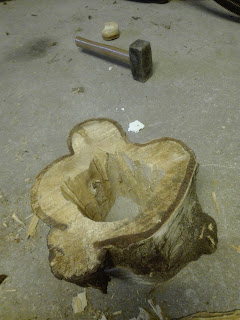
After smoothing the edges roughly (here the girls got to try out the sledge, at least until I began fearing for my fingers...) and then it was drilling time again. This time with a hole saw. According to different recipes for making nesting boxes, the opening should be between 30 mm and 50 mm in diameter to allow the smallest birds access. Since I had a 55 mm hole saw handy, the entrances became a bit bigger than intended. Again the girls helped and got a real kick out of the disc cuttings the hole saw made.

With one entrance on each side, it was time to decide top and bottom. The top got another, thinner hole, large enough to accomodate the hemp rope I had ready. Here the girls helped threading the rope through the hole.


After having dried indoors for well over a week, it was time to glue the lids onto the sides. The girls helped squeeze out the glue.


The finished result was pretty cool, and since the entrances are fairly big, filling bird seeds and cleaning out should be easy.

My oldest daughter wanted to make something with me to give to their grandparents for Christmas. My mother-in-law had a bird feeder on her wish list. Since we did not have much proper materials for a standard bird feeder, we chose to use this piece of wood instead:


Abonner på:
Innlegg (Atom)